Microsoft 365 Setup, Security and Support for Queensland Businesses
Loginet sets up, secures, migrates and supports Microsoft 365 so your team can email, meet and share files without the headaches. From licensing to Intune and Teams, we look after it all.
- 20+ IT experts certified in AWS, Microsoft, Cisco, Palo Alto, Fortinet and CEH
- 4+ years supporting Queensland small and medium businesses
- AWS Partner & Microsoft Azure Partner
Technologies We Work With






























What Is Microsoft 365?
Microsoft 365 support is the setup, migration, security and day-to-day management of your Microsoft 365 environment, including email, Teams, SharePoint, OneDrive, Intune and licensing.
In practice, that means choosing the right plans, moving email and files from Google or older systems, securing sign-ins with MFA and conditional access, managing devices with Intune, configuring Defender, backing up Microsoft 365 data and handling starters and leavers.
Many small and medium businesses pay for Microsoft 365 features they never switch on, or run it with default settings that leave security gaps. Good Microsoft 365 support makes sure your licences are right and your environment is secure.
Signs You Need Microsoft 365 Support
It’s time for help with Microsoft 365 when:
- You're not sure which plans you have or whether they're the right ones
- MFA isn't enforced for every user
- Files are scattered across personal OneDrives, email attachments and old servers
- Starters and leavers aren't set up or removed consistently
- You have Business Premium but aren't using Intune or Defender
- You're considering Copilot but aren't sure your data is ready
What's Included / How It Works in Practice
Microsoft 365 support from Loginet is scoped to your plans and needs. It typically includes:
- Tenant review: A check of licences, security settings, sharing and admin roles.
- Licensing advice: The right mix of Business Basic, Standard and Premium for your users.
- Migration: Email and file migrations planned to minimise disruption.
- Security baseline: MFA, conditional access, Defender and Intune configured and aligned with the Essential Eight where it suits.
- Backup: Separate backup of Microsoft 365 data.
- Ongoing administration: User changes, support and regular reviews.
Who Microsoft 365 Is For
Microsoft 365 support helps any business that uses it, or is about to.
- Businesses migrating from on-site email or Google Workspace
- Teams with messy SharePoint and Teams structures
- Organisations unsure whether their licences and security are right
- Businesses wanting devices managed with Intune
Benefits of Microsoft 365 With Loginet
Well-managed Microsoft 365 means a secure, organised workspace for your team and no money wasted on licences.
The right licences, no waste
We match each user to the plan they need and remove unused licences, so your subscription reflects reality. Licence changes happen as staff join, leave or change roles.
Stronger sign-in and data security
MFA, conditional access and threat protection are configured properly, closing common gaps attackers exploit. Stolen passwords alone are no longer enough to get into your accounts.
Smooth, planned migrations
Mail and files are copied in the background and cut over at a planned time, so staff barely notice the move. After cutover, we stay close to help with any teething issues.
Everyday admin handled
Starters, leavers, mailbox changes and permissions are done for you, quickly and securely. Your team gets changes made quickly without learning the admin portals.
Our Microsoft 365 Services
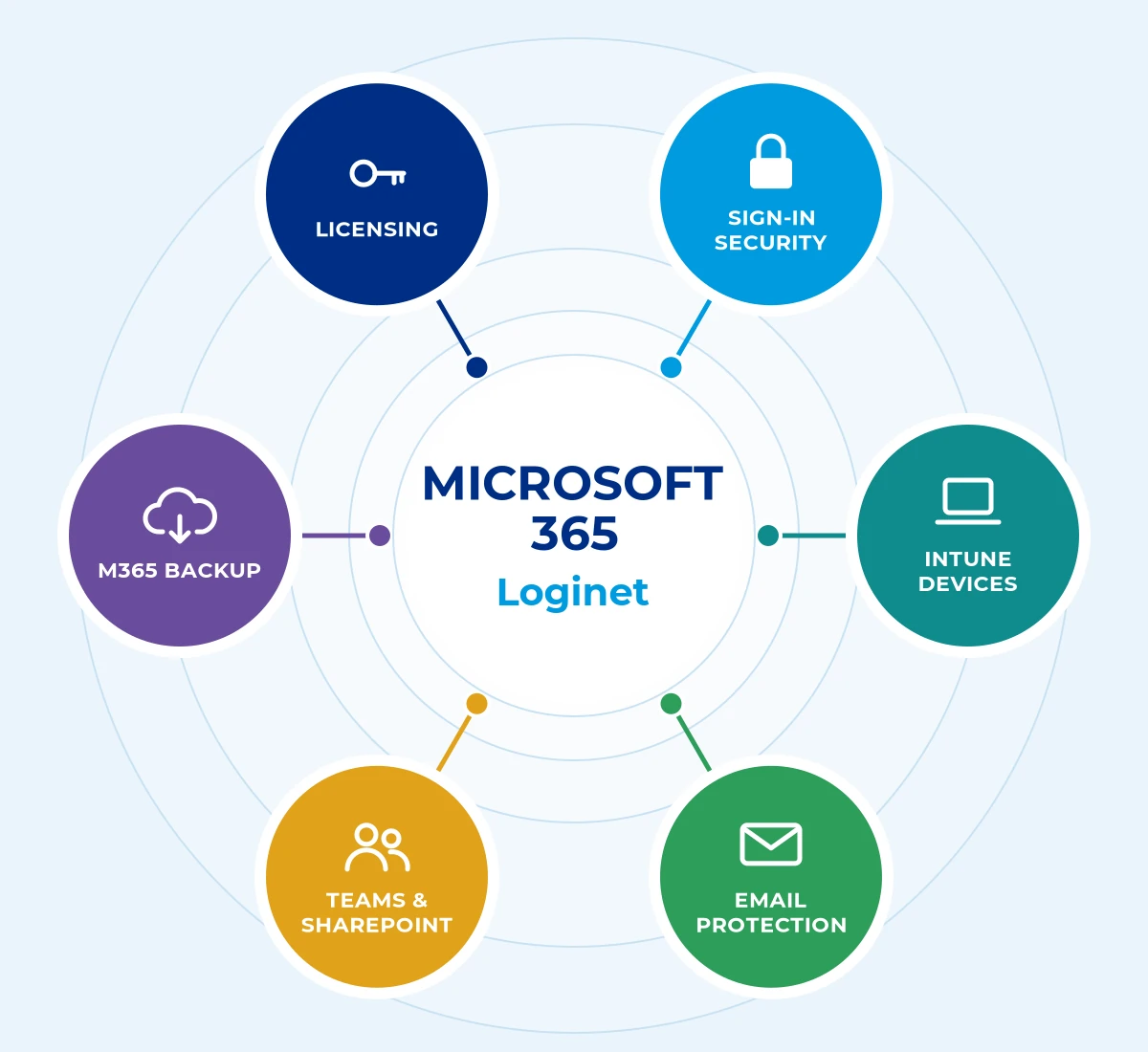
Loginet’s Microsoft 365 covers six core areas, scoped to suit your business so you only pay for what you need.
Licensing and plan choice
We review how your team works and recommend the right mix of plans, often Business Premium for its security features. You get the features you need without paying for ones you don't.
Email and threat protection
Exchange Online and Defender settings are hardened against phishing and malware. Fewer phishing emails reach your team.
Identity and sign-in security
MFA and conditional access with Microsoft Entra ID protect accounts from password attacks. Sign-ins from risky locations or unknown devices can be blocked automatically.
Teams, SharePoint and OneDrive
Collaboration spaces are structured with sensible permissions so files are easy to find and share. Staff stop saving files in random places, and leavers' data stays with the business.
Device management with Intune
Laptops and phones are enrolled, configured and secured centrally, even for remote staff. Lost or stolen devices can be wiped remotely to protect company data.
Microsoft 365 backup
Mail, files and Teams data are backed up independently to protect against deletion and ransomware. If something is deleted or encrypted, it can be restored.
How We Deliver Microsoft 365
Every Microsoft 365 engagement follows four clear steps, so you know the scope, timeline and cost before work starts.
1. Assess
We review your current setup and licences, so we know where the gaps and savings are.
2. Plan
We plan changes and migrations with you, so staff know what to expect.
3. Migrate and configure
We migrate and configure Microsoft 365 securely, with minimal disruption to the working day.
4. Support
We provide ongoing support and administration, so Microsoft 365 stays secure and well-used.
Microsoft 365 Across the Gold Coast, Toowoomba, Brisbane & Queensland
Loginet delivers Microsoft 365 from our Toowoomba head office and our Bundall office on the Gold Coast, with onsite support across Queensland and service available in other Australian states. Brisbane businesses are supported remotely, with onsite visits when needed. We support Microsoft 365 for businesses across South East Queensland, with Microsoft 365 support in Toowoomba from our head office, Microsoft 365 support on the Gold Coast from our Bundall office, and Microsoft 365 support for Brisbane businesses delivered remotely and on site from our Toowoomba and Bundall teams.
Gold Coast
Our Bundall office supports businesses across Southport, Surfers Paradise, Broadbeach, Robina and the wider Gold Coast.
Toowoomba
Our head office serves Toowoomba and the Darling Downs with local, onsite support.
Brisbane
We support Brisbane businesses remotely, with onsite visits arranged when your project needs them.
Regional Queensland
We provide onsite support across Queensland, with service available in other Australian states.
Why Choose Loginet for Microsoft 365
Loginet’s Microsoft-certified team manages Microsoft 365 as part of your wider IT.
- Microsoft Azure Partner: Staff hold Microsoft certifications.
- Security first: Configured with the Essential Eight in mind.
- Integrated support: Microsoft 365 handled alongside devices, network and cloud.
- Local: Toowoomba and Gold Coast offices.
Microsoft 365 FAQs
Here are straight answers to the questions we hear most. If yours isn’t covered, book a free 30-minute strategy call.
For most small and medium businesses, Microsoft 365 Business Premium offers the best balance of productivity and security. We’ll review your needs before recommending a plan.
Yes. We plan the migration, copy mail in the background and cut over with minimal disruption.
Microsoft provides service resilience, but dedicated backup protects you from deletion, ransomware and retention gaps. We recommend Microsoft 365 backup.
Enable MFA, conditional access, device management and email threat protection, and align settings with the Essential Eight.
Yes. We handle account setup, licence changes and secure offboarding.
Yes. Loginet is a Microsoft partner, and our staff hold Microsoft certifications.
Yes. Brisbane businesses are supported remotely, with onsite visits arranged when needed, from our Toowoomba head office and Bundall (Gold Coast) office.
Business Premium includes everything in Standard plus advanced security and device management tools, such as Intune and Defender for Business. It suits businesses that need stronger security controls.
Copilot works with the data your users can already access, so permissions and file sharing need to be tidy first. We can review your environment before you roll it out.
It depends on the number of users, the amount of email and files and where you’re migrating from. We provide a timeframe after reviewing your environment.
The number of users, the plans you use, the security features required and whether migration or backup is included all affect cost.
Book Your Free 30-Minute Strategy Call
The quickest way to get started is a free 30-minute strategy call. We’ll talk through your setup and goals and give you clear next steps, with no obligation. Prefer to write? Send us a message instead.
Let's talk about your IT
Book a free 30-minute strategy call with our team, or send us a message. No obligation, no hard sell, just straight answers about your IT, cloud and telecom.
Prefer to call?
Sales: Mon–Fri 9am–5pm AEST. Existing clients: 24/7 support on the same number.
Book a free 30-minute call
30 minutes · Video or phone · Times shown in Australia/Brisbane (AEST)
Calendar not loading? Open the booking page in a new tab (opens in a new tab)