
Managed IT Services Australia: What’s Actually Included (and What Isn’t)
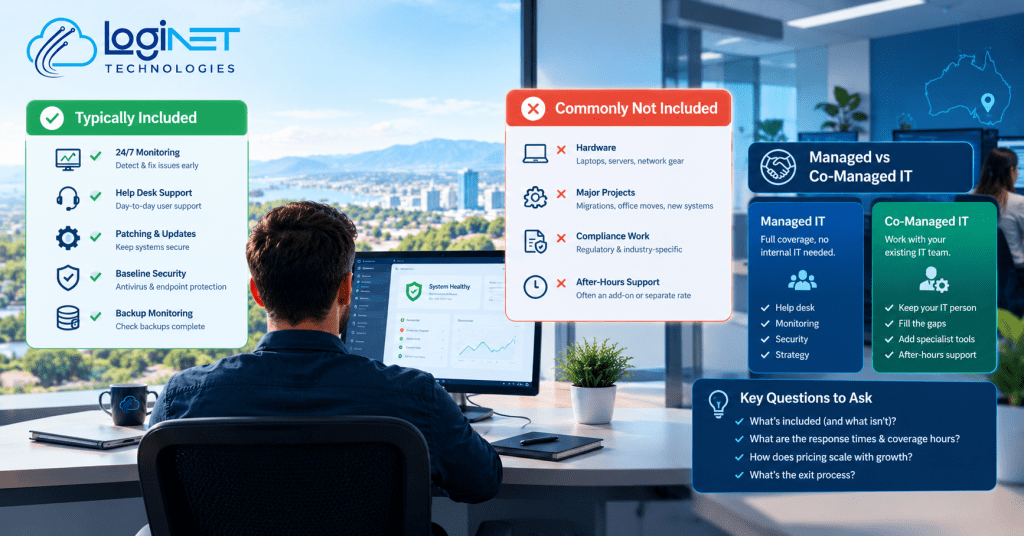
What’s actually included in managed IT services, and what costs extra? Most agreements cover day-to-day monitoring, help desk support, patching, and a baseline level of security tooling for a fixed monthly fee. What usually sits outside that fee is hardware, larger projects like a server migration or office move, and after-hours emergency callouts, unless the contract specifically says otherwise.
That distinction trips up a lot of business owners, not because providers are being deliberately vague, but because “managed IT” gets used as a catch-all term that means slightly different things depending on who’s selling it. Before signing anything, it’s worth understanding where the line actually sits, and a co-managed IT arrangement is one way that line can shift depending on how much your own team wants to keep handling in-house.
What’s Normally Covered Under a Standard Agreement
A typical managed IT services Australia agreement bundles a core set of ongoing work: monitoring servers and devices for problems before they become outages, a help desk for staff to call when something’s not working, patching operating systems and common software, and antivirus or endpoint protection as a baseline. Backup monitoring is usually included too, checking that backups actually ran and completed, rather than the storage or backup software licensing itself.
This is the “keep the lights on” layer of IT, and it’s genuinely valuable because most of what breaks in a small business network is routine, not dramatic. A failed update, a printer that’s fallen off the network, an account locked out after too many login attempts. None of that needs a specialist, but it does need someone watching and responding, which is exactly what the fixed monthly fee is paying for.
What’s Commonly Excluded (and Why That Surprises People)
The exclusions catch people off guard because they’re not always spelled out clearly in a sales conversation. Hardware is the big one, new laptops, servers, network switches, are almost always billed separately, since a fixed IT fee covering hardware refresh cycles would need to price in equipment costs the provider can’t control. Major projects fall outside the standard fee too, a server migration, a new office fit-out, rolling out a new line-of-business system, these are typically quoted and billed as separate projects rather than absorbed into monthly support.
Compliance work is another one that regularly gets missed. A lot of businesses assume their managed IT provider is handling regulatory obligations as part of the general service, when in reality baseline monitoring and a genuine compliance program are different things. If your business has specific obligations around data handling or industry regulation, that’s usually worth a dedicated conversation, sometimes structured as a compliance review, rather than assuming it’s quietly covered.
Managed IT Support Toowoomba: How Response Times and Coverage Hours Actually Work
Response time commitments are where the fine print matters most, and where local support availability genuinely affects the outcome. A “1 hour response time” sounds reassuring until you check what it actually promises, often it’s an acknowledgement that someone has seen the ticket, not that the issue is resolved within that hour. Coverage hours matter just as much: standard business-hours support (typically something like 8am to 5pm weekdays) is common as the baseline, with after-hours and weekend cover usually priced as an add-on or handled as a separate emergency callout rate.
For businesses in regional areas, it’s also worth asking whether support is genuinely local or routed through an interstate or offshore call centre for the first tier. That doesn’t automatically mean worse service, but it does change how quickly someone with real context on your setup gets involved when something’s gone wrong.
Reading a Proposal Without Getting Lost in the Jargon
IT proposals are dense on purpose, sometimes to appear thorough, sometimes just because the templates were built by technical people for other technical people. A few things are worth scanning for specifically: what’s the per-user or per-device pricing based on, and does it change if headcount grows mid-contract? Is security listed as “included” in vague terms, or does it specify exactly which tools and how they’re configured? And is there a minimum contract term, with what notice period to exit or renegotiate?
If a proposal is genuinely hard to parse, that’s worth taking as information in itself rather than just pushing through it. Getting a vCIO to review a proposal before signing is a reasonable step for businesses without anyone in-house who deals with IT contracts regularly, they can usually spot what’s missing faster than a first read would catch.
Where Co-Managed IT Changes This Equation
Co-managed IT works differently to a fully outsourced arrangement. Instead of handing over everything, your business keeps an internal IT person or small team handling day-to-day tasks and local knowledge, while the managed provider fills in specific gaps, after-hours monitoring, specialist security tools, or capacity during a big project. This model tends to suit businesses that have grown enough to justify some internal IT capability but aren’t at the size where a full internal team covering every specialism makes financial sense.
The practical effect on “what’s included” is that the split gets negotiated rather than fixed. A business might keep help desk in-house and outsource security monitoring and backup management, or the reverse, depending on where the internal team’s strengths and gaps actually sit. This is usually worked out through a proper capability assessment rather than a generic package, since every business’s internal setup looks different.
Questions to Ask Before Signing
A few direct questions tend to surface the gaps a proposal alone won’t: What exactly happens if we need something outside normal coverage hours, and what does that cost? If we add ten staff next quarter, does the price scale automatically or does the contract need renegotiating? And if things aren’t working out, what’s the actual exit process, data handover, transition support, and how much notice is required either way?
None of these questions are confrontational, and a provider who can’t answer them clearly is telling you something useful about how the relationship would actually run day to day.
FAQ
Is cyber security included in managed IT services, or a separate cost?
It depends on the tier of the agreement. Baseline protection like antivirus and patching is usually included, but more advanced security monitoring and response is often a separate add-on rather than bundled by default, so it’s worth checking exactly what’s covered rather than assuming.
What happens if we outgrow our current provider’s plan?
Most agreements allow scaling up, adding users, devices, or services, but how smoothly that happens depends on the contract terms. Some providers rework pricing automatically as headcount grows, others require a formal renegotiation, which is worth clarifying before signing rather than after.
Can we start with managed IT services and add co-managed later?
Yes, this is a common path. Businesses often start fully outsourced while small, then shift toward a co-managed model once they’ve hired internal IT capability, adjusting which parts of the service the provider still handles.
Get a plain-English breakdown of what’s included in your quote.


