Remote Monitoring and Management for Queensland Businesses
Loginet’s remote monitoring and management (RMM) watches your servers, network, backups and devices 24/7, so small issues get spotted and fixed before they become downtime. Fewer surprises, fewer Monday-morning headaches.
- 20+ IT experts certified in AWS, Microsoft, Cisco, Palo Alto, Fortinet and CEH
- 4+ years supporting Queensland small and medium businesses
- AWS Partner & Microsoft Azure Partner
Technologies We Work With


























What Is Remote Monitoring and Management?
Remote monitoring and management (RMM) is a service where an IT provider uses software agents to watch the health of your servers, network devices and computers around the clock, and fixes many issues remotely before they cause downtime.
Day to day, the RMM platform checks things like disk space, failed updates, backup results, device availability and security alerts. When something crosses a threshold, an alert reaches our engineers, who investigate and resolve it, often without staff ever knowing there was a problem. Patches are deployed on a schedule, and every device is tracked in one place.
For small and medium businesses, RMM replaces the reactive cycle of waiting for something to break. It reduces unplanned outages and gives you a clear picture of the condition of your IT.
Signs You Need Remote Monitoring and Management
RMM is worth a look when IT problems keep catching you by surprise. Common signs include:
- You find out about failed backups only when you need a restore
- Servers or storage fill up and stop working without warning
- Updates are installed when someone remembers, if at all
- Problems are discovered by staff on Monday morning
- You don't have an accurate list of devices on your network
What's Included / How It Works in Practice
Our RMM service combines monitoring software with engineers who act on what it finds. It typically includes:
- Monitoring agents: Lightweight software installed on servers and computers to report health and status.
- Alert thresholds: Checks for disk space, services, availability, backups and security events, tuned to your environment.
- Alert response: Our engineers review alerts 24/7 and resolve or escalate them under the agreed process.
- Patch management: Scheduled operating system and supported application updates, with results reported.
- Asset inventory: An up-to-date list of monitored devices and their key details.
- Essential Eight patching: Scheduled patching supports the Essential Eight 'patch applications' and 'patch operating systems' strategies.
- Monthly reporting: A summary of alerts, patch status and recommendations.
Who Remote Monitoring and Management Is For
RMM is valuable for any business where a server outage or failed backup would stop work.
- Businesses running on-site servers or network equipment
- Organisations that can't afford weekend issues becoming Monday outages
- Businesses with remote staff whose devices need to stay updated
- Teams that want proof backups and updates are actually happening
Benefits of Remote Monitoring and Management With Loginet
RMM turns IT from reactive to proactive: problems are found and fixed early, often before anyone notices.
Fewer unexpected outages
Warning signs like failing disks, high memory use and full storage trigger alerts long before failure. Problems get fixed on our schedule, not during your busiest hour. Problems are caught early, while they're still quick to fix.
No more Monday-morning surprises
Because monitoring runs 24/7, issues that start on a weekend are picked up when they happen. Your team arrives to systems that work. Overnight and weekend issues are flagged and actioned before the working week starts.
Fixes that don't interrupt staff
Many issues are resolved remotely in the background. Staff keep working while engineers sort out the problem. Most work happens remotely and in the background.
A clear view of your IT
You get an up-to-date picture of every monitored device, its health and its patch status. Planning upgrades becomes far easier. You can see device health, patch status and alerts at a glance.
Our Remote Monitoring and Management Services
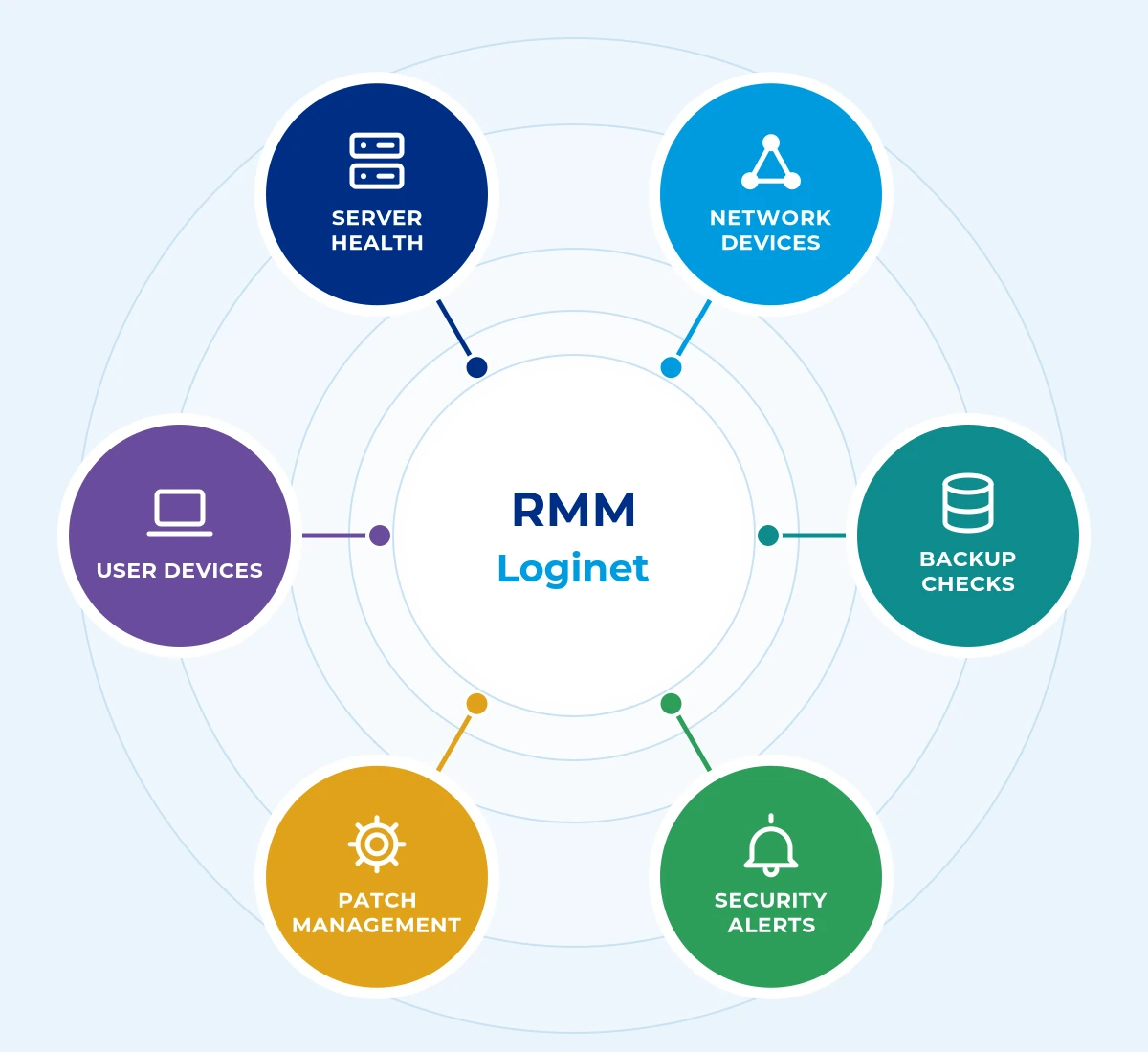
Loginet’s remote monitoring and management covers six core areas, scoped to suit your business so you only pay for what you need.
Server health monitoring
We track CPU, memory, disk space, services and hardware health. Capacity problems are flagged early so you can plan upgrades rather than react.
Security alert handling
Alerts from endpoint protection are reviewed and actioned by engineers. Suspicious activity doesn't sit unnoticed in a console.
Network device monitoring
Firewalls, switches and access points are checked for availability and faults. If a link drops, we know about it straight away.
Patch management
Operating system and application updates are approved, scheduled and applied. Known vulnerabilities are closed quickly with minimal disruption.
Backup status checks
Backup jobs are checked every day. Failed or missed backups are investigated and fixed before they leave a gap.
User device monitoring
Laptops and desktops are kept healthy, updated and visible, wherever staff are working. Devices that miss updates or run low on storage are flagged and fixed, even for remote staff.
How We Deliver Remote Monitoring and Management
Every remote monitoring and management engagement follows four clear steps, so you know the scope, timeline and cost before work starts.
1. Discover
We identify the servers, network devices and computers that matter most, so monitoring focuses on what keeps your business running.
2. Deploy agents
Monitoring agents are installed quietly in the background, with no disruption to staff.
3. Monitor and respond
Our team watches alerts 24/7 and acts on them quickly, so small issues are fixed before they become outages.
4. Report
Regular reports show what was found and fixed, and where to invest next.
Remote Monitoring and Management Across the Gold Coast, Toowoomba, Brisbane & Queensland
Loginet delivers remote monitoring and management from our Toowoomba head office and our Bundall office on the Gold Coast, with onsite support across Queensland and service available in other Australian states. Brisbane businesses are supported remotely, with onsite visits when needed. We support remote monitoring and management for businesses across South East Queensland, with managed IT in Toowoomba from our head office, managed IT on the Gold Coast from our Bundall office, and managed IT for Brisbane delivered remotely and on site from our Toowoomba and Bundall teams.
Gold Coast
Our Bundall office supports businesses across Southport, Surfers Paradise, Broadbeach, Robina and the wider Gold Coast.
Toowoomba
Our head office serves Toowoomba and the Darling Downs with local, onsite support.
Brisbane
We support Brisbane businesses remotely, with onsite visits arranged when your project needs them.
Regional Queensland
We provide onsite support across Queensland, with service available in other Australian states.
Why Choose Loginet for Remote Monitoring and Management
Monitoring is only useful if someone acts on it, and that’s where our engineers come in.
- Alerts handled by people: Certified engineers review and resolve what the tools find.
- 24/7 coverage: Your systems are watched around the clock.
- Tuned, not noisy: Alert rules are adjusted so real problems stand out.
- Part of a bigger picture: Monitoring connects with helpdesk, security and backup services.
Remote Monitoring and Management FAQs
Here are straight answers to the questions we hear most. If yours isn’t covered, book a free 30-minute strategy call.
RMM is software installed on your servers and devices that reports health, performance and update status 24/7, so engineers can detect and fix issues remotely.
We monitor server health, network devices, backup status, security alerts, software updates and user devices. The exact scope is agreed during onboarding.
No. The monitoring agent is lightweight, and updates are scheduled to minimise disruption to your team.
Our engineers review the alert, fix the issue remotely where possible and contact you if action or an onsite visit is needed.
RMM is one part of managed IT. Managed IT services combine monitoring with helpdesk support, security and IT planning.
Yes. Your systems are monitored around the clock, with alerts handled according to the agreed scope.
Yes. Monitoring is delivered remotely across Queensland, including Brisbane, with onsite visits when needed.
Cost depends mainly on the number and type of devices monitored and whether patching and alert response are included. We provide a quote once we know your environment.
Agents can be deployed quickly, but tuning alert thresholds so you only get meaningful alerts usually takes a few weeks of fine-tuning.
Yes. Antivirus protects against malware, but RMM watches the overall health of your systems, such as disk space, updates, backups and device availability.
RMM focuses on monitoring device health, alerting and patching. MDM tools such as Microsoft Intune focus on enrolling devices and enforcing settings and security policies. Many businesses use both.
Book Your Free 30-Minute Strategy Call
The quickest way to get started is a free 30-minute strategy call. We’ll talk through your setup and goals and give you clear next steps, with no obligation. Prefer to write? Send us a message instead.
Let's talk about your IT
Book a free 30-minute strategy call with our team, or send us a message. No obligation, no hard sell, just straight answers about your IT, cloud and telecom.
Prefer to call?
Sales: Mon–Fri 9am–5pm AEST. Existing clients: 24/7 support on the same number.
Book a free 30-minute call
30 minutes · Video or phone · Times shown in Australia/Brisbane (AEST)
Calendar not loading? Open the booking page in a new tab (opens in a new tab)