Managed Endpoint Protection Services for Queensland Businesses
Loginet’s managed endpoint protection secures every laptop, desktop and server with next-generation antivirus and endpoint detection and response, configured properly and monitored 24/7. Stop more threats with less effort from your team.
- 20+ IT experts certified in AWS, Microsoft, Cisco, Palo Alto, Fortinet and CEH
- 4+ years supporting Queensland small and medium businesses
- AWS Partner & Microsoft Azure Partner
Technologies We Work With






























What Is Managed Endpoint Protection?
Endpoint protection services secure your laptops, desktops and servers against malware, ransomware and other threats, using modern protection tools that are deployed, configured and monitored for you.
Day to day, that means next-generation antivirus that looks at behaviour, not just known signatures, endpoint detection and response (EDR) that records activity so threats can be investigated, plus device control, web filtering and vulnerability management. Policies are set centrally and alerts are monitored 24/7.
Small and medium businesses often rely on free or consumer antivirus installed device by device, with no one checking whether it’s working. Managed endpoint protection gives you consistent protection on every device and someone watching the alerts.
Signs You Need Endpoint Protection Services
It’s time to review endpoint protection when:
- Devices use a mix of different or free antivirus products
- Nobody checks whether antivirus is up to date on every device
- Staff can plug in any USB device or install any software
- You've had a malware or ransomware scare
- Your cyber insurer asks whether you use EDR
What's Included / How It Works in Practice
Our managed endpoint protection is scoped to your devices and typically includes:
- Deployment: Protection installed on Windows and Mac devices and servers, with coverage confirmed.
- Policy configuration: Settings tuned for your business, including ransomware protection.
- EDR: Activity recording to help detect and investigate threats.
- Device and web controls: USB device control and web filtering where required.
- 24/7 alert monitoring: Alerts monitored and handled in line with the agreed process.
- Reporting: Regular summaries of device coverage, threats and vulnerabilities.
Who Managed Endpoint Protection Is For
Managed endpoint protection is essential for any business with computers connected to the internet.
- Businesses relying on basic or free antivirus
- Organisations with remote and hybrid staff
- Businesses that have had a malware or ransomware scare
- Companies working towards the Essential Eight
Benefits of Managed Endpoint Protection With Loginet
Managed endpoint protection keeps every device protected and monitored, without your team having to manage it.
Stronger than traditional antivirus
Behaviour-based detection spots malicious activity even when the malware is new. Threats that slip past signature-based tools are caught.
Configured properly from day one
Policies, exclusions and updates are set by engineers who know the platform, avoiding gaps from default settings. Protection works as intended without getting in your team's way.
Rolled out quickly
Protection is deployed across your devices remotely with minimal disruption, including off-site staff. Every device is covered, wherever it is.
Clear reporting
Regular reports show device protection status and threats blocked, so you know your fleet is covered. Unprotected or out-of-date devices are flagged straight away.
Our Managed Endpoint Protection Services
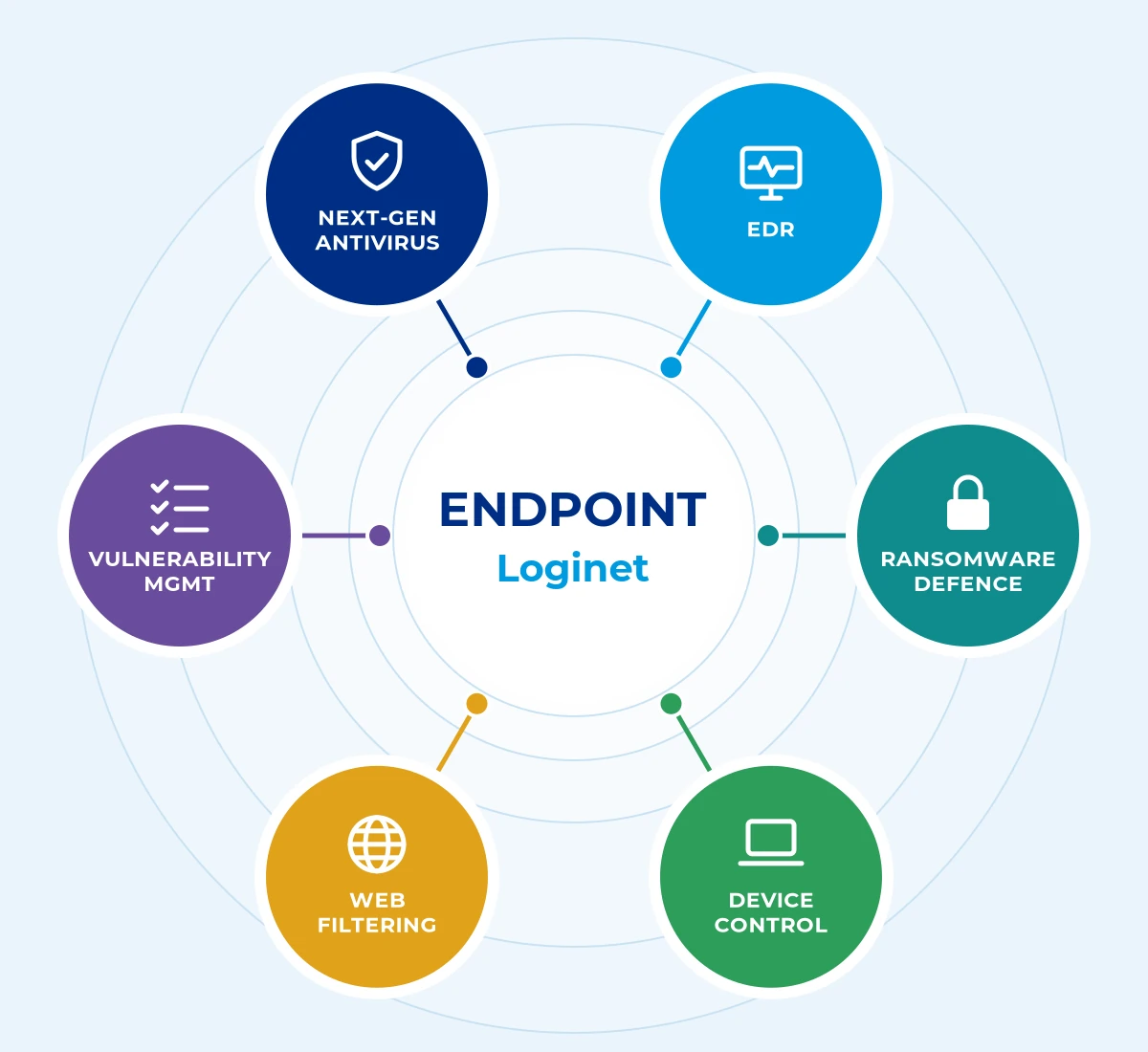
Loginet’s managed endpoint protection covers six core areas, scoped to suit your business so you only pay for what you need.
Next-generation antivirus
Behaviour and machine-learning based protection against known and new malware. Threats are blocked before they can run.
Device control
USB and peripheral access managed to reduce data loss and infection risk. Only approved devices can connect.
Endpoint detection and response (EDR)
Device activity is recorded so suspicious behaviour can be detected, investigated and stopped. Engineers can see exactly what happened on a device and act fast.
Web filtering
Malicious and unwanted websites blocked before they load. Staff are protected from dangerous sites, even outside the office.
Ransomware protection
Layered defences against encryption attacks, including rollback where the platform supports it. Suspicious encryption activity is stopped early to limit damage.
Vulnerability management
Missing patches and weak configurations identified and fixed. Known weaknesses are closed before attackers can use them.
How We Deliver Managed Endpoint Protection
Every managed endpoint protection engagement follows four clear steps, so you know the scope, timeline and cost before work starts.
1. Review
We review your current protection and devices, so we know exactly what needs securing.
2. Deploy
We deploy protection across your devices with minimal disruption to staff.
3. Configure
We configure policies that suit your business, so protection is strong without getting in the way.
4. Monitor and report
We monitor alerts and report regularly, so you always know your devices are protected.
Managed Endpoint Protection Across the Gold Coast, Toowoomba, Brisbane & Queensland
Loginet delivers managed endpoint protection from our Toowoomba head office and our Bundall office on the Gold Coast, with onsite support across Queensland and service available in other Australian states. Brisbane businesses are supported remotely, with onsite visits when needed. We support endpoint protection for businesses across South East Queensland, with managed IT in Toowoomba from our head office, managed IT on the Gold Coast from our Bundall office, and managed IT in Brisbane delivered remotely and on site from our Toowoomba and Bundall teams.Loginet delivers managed endpoint protection from our Toowoomba head office and our Bundall office on the Gold Coast, with onsite support across Queensland and service available in other Australian states. Brisbane businesses are supported remotely, with onsite visits when needed.
Gold Coast
Our Bundall office supports businesses across Southport, Surfers Paradise, Broadbeach, Robina and the wider Gold Coast.
Toowoomba
Our head office serves Toowoomba and the Darling Downs with local, onsite support.
Brisbane
We support Brisbane businesses remotely, with onsite visits arranged when your project needs them.
Regional Queensland
We provide onsite support across Queensland, with service available in other Australian states.
Why Choose Loginet for Managed Endpoint Protection
Loginet manages endpoint protection as part of a layered security approach.
- Certified security staff: CEH, Palo Alto, Fortinet and Microsoft certifications in the team.
- 24/7 monitoring: Alerts watched around the clock.
- Layered defence: Works with email security, patching and backups.
- Local: Toowoomba and Gold Coast offices.
Managed Endpoint Protection FAQs
Here are straight answers to the questions we hear most. If yours isn’t covered, book a free 30-minute strategy call.
Endpoint protection is security software that protects devices like laptops, desktops and servers from malware, ransomware and other threats.
EDR (endpoint detection and response) records device activity to detect, investigate and respond to suspicious behaviour that traditional antivirus may miss.
Modern endpoint protection includes antivirus but adds behaviour analysis, EDR, device control and centralised management.
Yes. Endpoint alerts are covered by 24/7 monitoring and reviewed by our engineers.
Modern endpoint protection is lightweight and designed to run without noticeably slowing devices.
Yes. It supports several Essential Eight strategies, alongside patching, application control and other controls.
Yes. Brisbane businesses are supported remotely, with onsite visits arranged when needed, from our Toowoomba head office and Bundall (Gold Coast) office.
Cost depends on the number and type of devices, the features required, such as EDR and device control, and the level of monitoring.
Most rollouts can be completed quickly once the plan is agreed, depending on the number of devices and sites.
EDR focuses on detecting and responding to threats on individual devices. XDR extends detection across more sources, such as email, identity and network, in one platform.
Business Premium includes Microsoft Defender for Business, which provides endpoint protection. It still needs to be deployed, configured and monitored properly to be effective.
Often, yes. Many modern endpoint tools keep protected copies of files that ransomware can’t delete, so encrypted files can be rolled back to their pre-attack state. Pair it with tested backups for full recovery.
Yes. Macs are increasingly targeted, and a compromised Mac can still be used to access your systems and data. We protect Windows and macOS devices, plus servers.
Book Your Free 30-Minute Strategy Call
The quickest way to get started is a free 30-minute strategy call. We’ll talk through your setup and goals and give you clear next steps, with no obligation. Prefer to write? Send us a message instead.
Let's talk about your IT
Book a free 30-minute strategy call with our team, or send us a message. No obligation, no hard sell, just straight answers about your IT, cloud and telecom.
Prefer to call?
Sales: Mon–Fri 8:30am–5pm AEST. Existing clients: 24/7 support on the same number.
Book a free 30-minute call
30 minutes · Video or phone · Times shown in Australia/Brisbane (AEST)
Calendar not loading? Open the booking page in a new tab (opens in a new tab)