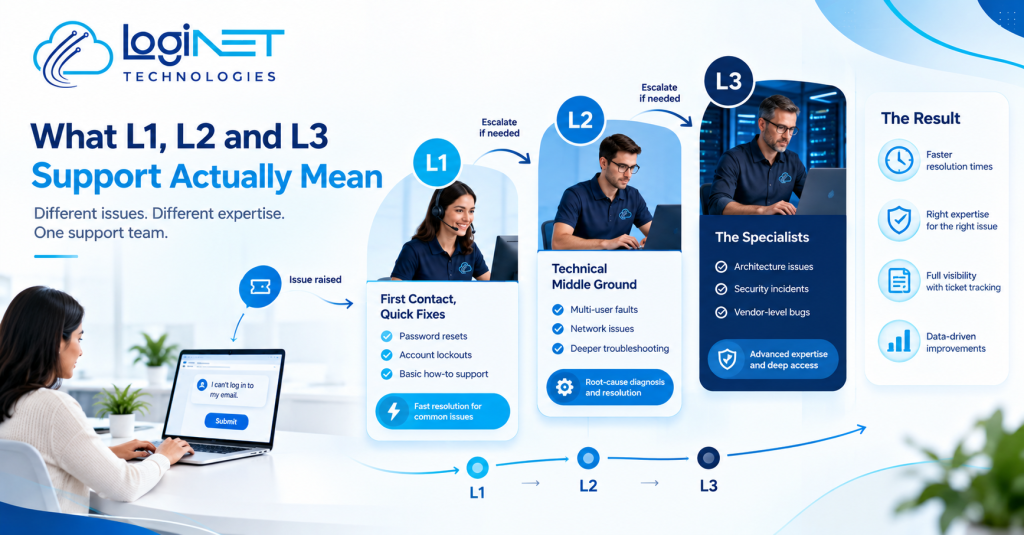
What L1, L2 and L3 Support Actually Mean
Ever been told your issue is “being escalated” and wondered what that actually means for how long you’ll wait? L1, L2 and L3 aren’t just labels on a ticket. They describe complexity, the access and expertise needed, and who’s responsible for solving the problem at each stage. Get the structure, and the whole escalation process stops feeling like a black box.
IT help desk services split into these tiers for a reason, and this article walks through what each level actually does, how a ticket moves between them, and what that means for your response times and your SLA. If you’d like to see how Loginet structures its own support, the help desk services page has the detail.
Why tiers exist at all
Without tiers, every ticket would need someone senior, and senior people are expensive and thin on the ground. Tiering matches the problem to the right level of expertise, so a specialist’s time is spent where it’s actually needed and a straightforward issue gets a fast, appropriate fix without waiting in line behind harder problems. It also means most issues get resolved quickly, since password resets and login problems make up a large share of any help desk’s volume.
L1: first contact, quick fixes
L1 is the front door. This is where your call or ticket lands first, staffed by people trained to work through a known set of common issues using a script or knowledge base. Password resets, printer problems, “my email’s not syncing,” account lockouts, these are bread-and-butter L1 work. A good L1 technician resolves a large share of tickets without ever passing them along.
L1 also does the triage. If a problem doesn’t match anything in the playbook, or turns out to be more serious than it first looked, they’re the ones who escalate it, and they should be gathering the right detail before they do, so you don’t have to repeat yourself.
L2: the technical middle ground
L2 picks up what L1 can’t solve on the spot. This is deeper troubleshooting: a server acting oddly, a network issue that isn’t obviously one device’s fault, software behaving inconsistently across multiple users. L2 technicians generally have broader system access and more experience diagnosing root causes rather than following a fixed script.
Many MSPs structure their support this way, and in practice, the bulk of what a business experiences month to month gets resolved at L1 and L2. A healthy support setup keeps it that way.
L3: the specialists
L3 is where the genuinely hard problems land: architecture-level issues, complex security incidents, custom integrations, or bugs that need someone who understands a system at a deep, sometimes vendor-level, degree. L3 staff are often fewer in number and more specialised, sometimes even engineers who worked on building the original system.
Escalating to L3 isn’t a failure of the lower tiers. It’s the tiering doing its job: a rare, complicated problem reaching the person actually equipped to solve it, rather than everyone guessing at the same level.
| Level | Typical issue | Access and expertise required | Who handles it |
|---|---|---|---|
| L1 | Password resets, account lockouts, simple how-to questions | Standard system access, playbook-driven | Front-line support staff |
| L2 | Multi-user faults, network oddities, deeper troubleshooting | Broader access, root-cause diagnosis | Experienced technicians |
| L3 | Architecture issues, security incidents, vendor-level bugs | Deep or specialist system access | Specialists and senior engineers |
How a ticket actually moves through the levels
Most providers track this through help desk ticketing systems, which log the issue, timestamp it, and follow it as it moves. That’s less about bureaucracy than it sounds. Nothing gets lost, you get a reference number to follow up on, and if a ticket gets escalated, the new technician can see exactly what’s already been tried instead of starting from scratch.
A well-run ticketing system also feeds SLA reporting: how long tickets sit at each level, how often things get escalated, and where the bottlenecks actually are. Ask your provider whether this data is available and how they use it to improve support performance.
Where this fits into proactive vs reactive IT support
Tiered support is mostly reactive by nature, something’s already gone wrong when a ticket’s raised. That’s fine, and it’s not in tension with the proactive side of managed IT, monitoring, patching, planning, which aims to stop tickets from being needed in the first place. A mature provider runs both: proactive work to keep volume down, and a solid tiered structure underneath for whatever still gets through.
What good tiering means for your SLA
This structure directly shapes what your SLA can realistically promise. A provider offering managed IT support in Toowoomba, or anywhere else, should be able to tell you what response time to expect at each level, not just an overall average that hides how long the hard problems actually take. Escalation time targets vary by provider and by plan, so the actual numbers belong in your agreement, not in a general article like this one.
What you should expect from a good MSP is transparency about all of it: how a ticket gets classified, how escalation works, and what the data says about how often each level gets used. That transparency is a better signal of quality than any single response-time number on its own.
Questions worth asking your provider
How is a ticket decided to be L1, L2 or L3 from the start?
Ask whether it’s based on a fixed set of rules, or a technician’s judgement call. Both are normal, but you should know which one your provider uses, since it affects how consistently issues get triaged.
What happens if my issue keeps bouncing between levels?
This shouldn’t happen often. Ask what your provider does if a ticket gets escalated and then sent back down unresolved, since that pattern usually points to a process gap worth raising directly.
Does a higher level mean a longer wait?
Not necessarily, though complex L3 work naturally takes longer to diagnose properly. A good provider should still be able to give you a rough idea of timeframe once the issue’s understood, even if the fix itself takes time.
Where to go from here
So in short: L1, L2 and L3 describe complexity and expertise, not a hierarchy designed to slow you down, and understanding it makes it easier to judge whether your IT support is actually working the way it should. Loginet’s own managed IT services are built around this same tiering, with clear escalation paths behind the scenes.
If you’d like your current support setup reviewed against this structure, get in touch and we’re happy to walk through it plainly.