Co-Managed IT Support Toowoomba: What Actually Happens After Hours
Short answer. Someone outside your business watches your systems overnight under a proper co-managed setup. Catches the alerts your internal team can’t. Escalates whatever’s serious. Your IT person isn’t the one getting woken up at 2am, and that’s the whole point.
Plenty of owners assume “after hours” means their IT person’s phone rings all night if something breaks. Co-managed IT support Toowoomba businesses actually run doesn’t work that way. External side carries the overnight weight. Not your staff member’s sleep.
What’s actually being watched overnight
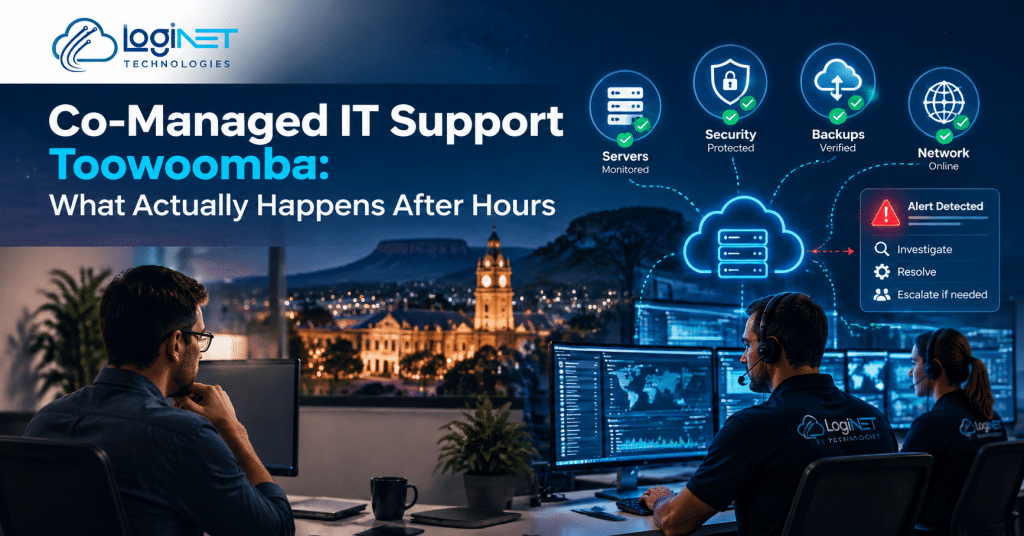
Servers don’t clock off at 5. Neither does whatever’s probing them for a way in. Login attempts, backup jobs, firewall activity, disk space quietly filling. None of it pauses because the lights are off.
24/7 monitoring and security management is the backbone of this. Continuous watching, not a glance over coffee the next morning. Backup fails at 11pm, silently? Someone knows before 9am. Not three days later when you actually need the restore and it isn’t there.
Ties straight into remote monitoring running quietly in the background. Alerts fire on their own. A person reviews what matters, decides what needs action now and what can sit until morning.
How an incident actually gets handled at night
Not every alert needs a human dragged out of bed. Most don’t. A server restarting and coming back clean, no drama. A ransomware indicator firing at 1am, very different story.
Roughly how it plays out:
- Low-severity alerts. Logged, reviewed come morning. No 3am calls over something that sorted itself out.
- Medium-severity stuff, a service degraded but not dead, gets a response inside an agreed window. Nobody’s guessing what “fast” means at that point.
- Critical incidents. Active breach, full outage. Immediate escalation, following a process agreed to well before it was ever needed. Not improvised by whoever happens to be awake.
That escalation path matters more than people think. Vendor escalation support means when a problem traces back to your internet provider, your cloud host, a piece of hardware still under warranty, someone’s already on the phone chasing it. Not waiting till 9am for anyone to even answer.
Where your internal person actually fits
Not about sidelining anyone here. It’s a hybrid IT support model. Your person still owns the relationship, still makes the calls that need someone who actually knows your business. External side just covers the hours they’re not working. Shouldn’t be, either.
Most arrangements run on one rule. Overnight, weekends, public holidays, external team’s first line. Monday, everything gets handed over with an actual record. Not a vague “something happened Saturday” mentioned in passing on the way to the kettle.
Exactly where an MSP for internal IT teams earns its place. Not a replacement. Just making sure nobody’s internal person is expected to be awake at 3am every Tuesday, indefinitely, because that’s genuinely unreasonable to ask of one human.
What doesn’t get covered
Co-managed after-hours support isn’t unlimited help for every request, any hour. A password reset that isn’t urgent. A software install someone forgot to ask for during the day. These wait for business hours, generally, unless there’s a specific agreement saying otherwise.
| Scenario | Handled after hours? | How |
|---|---|---|
| Server or network outage | Yes | Immediate escalation, vendor contact if needed |
| Security incident | Yes | Immediate response per agreed protocol |
| Backup failure | Flagged overnight | Actioned next business day unless urgent |
| Routine password reset | Usually not | Logged for next business day |
| New software request | No | Scheduled during business hours |
A co-managed helpdesk Australia businesses rely on draws that line upfront. No guessing at 11pm whether something qualifies.
Why this matters more than people think
A solo IT person carrying after-hours alone, every night, burns out. Fast. Not a work-ethic issue. Just maths. Internal IT overflow support exists so critical coverage doesn’t ride entirely on one person’s phone being on every hour of their actual life.
Changes what gets caught too. Someone glancing at a dashboard at 7am after a rough night works under worse conditions than a dedicated after-hours team whose entire job, right then, is exactly this. Broader IT support during the day pairs with the overnight coverage so nothing slips through the gap between the two.
A few things people actually ask
Does after-hours coverage mean someone’s physically on-site overnight?
No. Generally remote monitoring with a response team on standby. Physical attendance, if it’s ever needed, is the exception, not the default.
What should be treated as an emergency, and what can wait?
Security incidents and outages stopping the business running, those are emergencies. Most other requests, annoying as they are, can wait a few hours without real cost.
Can we set our own rules for what gets escalated immediately?
Yes, you should, honestly. What counts as urgent shifts business to business, which is exactly why it gets agreed upfront rather than guessed at mid-incident.
Get in touch with Loginet Technologies and we’ll walk through what co-managed IT support in Toowoomba would mean for your setup.