Last reviewed: October 2026
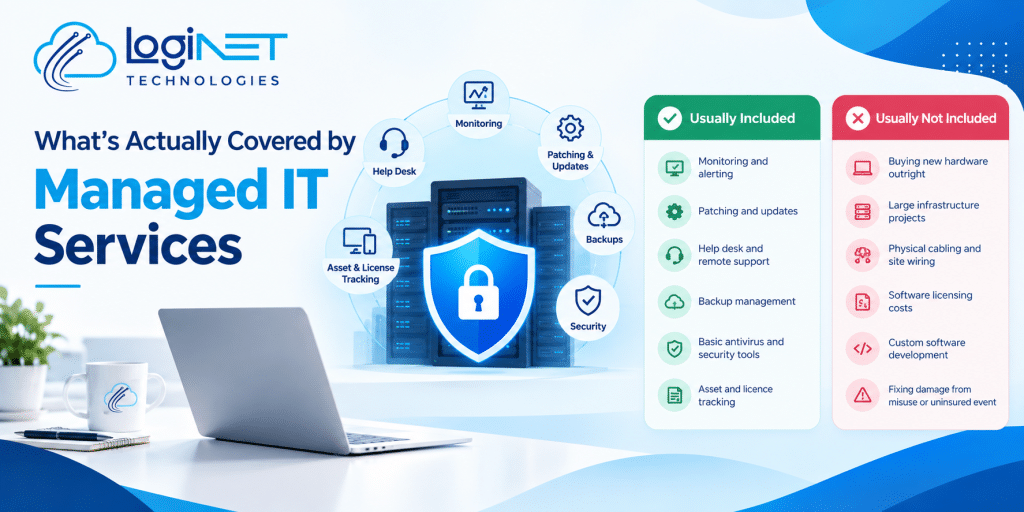
Short answer: Managed IT usually includes a help desk for your staff, 24/7 monitoring, patching, endpoint and email security, Microsoft 365 administration, backup checks, setting up and removing users, vendor management and regular reviews, all for a fixed monthly fee per user. Projects, new hardware, licences and some onsite or after-hours work are often extra, so check the schedule.
If you’re comparing managed IT quotes, the monthly price only means something once you know what sits behind it. This checklist covers what a good plan should include, what usually costs extra, how response times work, and the questions to ask before you sign. It applies whichever provider you choose, and it works whether you have five staff or five hundred.
The managed IT checklist: what should be included
Use this table to compare proposals line by line. If a provider can’t answer the question in the right-hand column clearly, ask for it in writing.
| Inclusion | What it means | Question to ask |
|---|---|---|
| Help desk (L1 to L3) | Staff can phone, email or log a ticket for everyday IT problems, from password resets to complex faults. | Which levels are covered, during which hours, and is there a cap on tickets or hours? |
| 24/7 monitoring and alerting | Tools watch your devices, servers and network around the clock and raise alerts when something fails or looks wrong. | Who responds to an alert at 2 am, and what happens next? |
| Patching | Operating system and application updates are tested and installed on a schedule. | Are third-party apps (browsers, PDF readers, Zoom) patched as well as Windows? |
| Endpoint security | Antivirus or endpoint detection and response (EDR) on every laptop, desktop and server. | Which product, and is it included or charged per device? |
| Email security | Filtering for spam, phishing and malicious attachments, plus email authentication records. | Is advanced email filtering included or an add-on? |
| MFA and identity | Multi-factor authentication and sensible sign-in policies for every user. | Is MFA enforced for all staff, including admins and shared accounts? |
| Microsoft 365 administration | Mailboxes, Teams, SharePoint, licences and security settings looked after for you. | Are licences included in the price or billed separately? |
| Backup monitoring and restore tests | Someone checks that backups ran and regularly proves files can be restored. | How often are restores tested, and what do you report? |
| Starters and leavers | New staff set up with accounts and devices; leavers removed securely. | Is onboarding a new user included, and how much notice do you need? |
| Vendor management | Your provider deals with internet, phone and software suppliers on your behalf. | Which vendors will you deal with, and is there a limit? |
| Documentation | Passwords, network diagrams and procedures recorded and kept up to date. | Do we get a copy, and what is handed over if we leave? |
| Reporting and reviews | Regular reports on tickets, security and device health, with a review meeting. | How often do reviews happen, and who attends? |
| IT planning (vCIO) | A roadmap and budget for upgrades, renewals and projects. | Is strategic planning included, or billed as a separate service? |
Not every business needs every line. A five-person office may not need formal IT planning, while a 50-person firm with cyber insurance obligations probably does. What matters is that you know which items are in the price and which aren’t.
What usually costs extra
Even good plans have exclusions. These are the items most often charged separately, though the details vary by provider:
- Hardware and licences: new laptops, servers, network gear and software subscriptions such as Microsoft 365 are usually billed on top of the support fee.
- Projects: one-off work such as email migrations, office moves, new servers or a network upgrade is often quoted as a separate project.
- Onsite visits: some plans include them, some charge per visit, and some include them only within a set distance.
- After-hours work: support outside business hours is often charged at a higher rate unless your plan includes it.
- Onboarding: some providers charge a setup fee to document your environment and install their tools.
- Third-party software: line-of-business applications are often supported only on a best-effort basis, with the software vendor handling deeper issues.
None of these is a red flag on its own. The red flag is finding out after you sign. Our guide to how much managed IT costs in Queensland shows how these extras affect the total.
Help desk levels, response times and SLAs
L1, L2 and L3 explained
Help desks usually work in three levels. Level 1 handles common requests such as password resets and printer problems. Level 2 handles deeper technical issues that need more experience. Level 3 covers complex problems that need a senior engineer or the vendor. Read more in what L1, L2 and L3 support actually mean.
Response time vs resolution time
Response time is how quickly someone starts working on your request. Resolution time is how long it takes to fix. Providers usually commit to response times, because some problems take longer to resolve than anyone can predict. A good service level agreement (SLA) sets out both by priority, for example a different target for “the whole office is down” than for “one user can’t print”.
When you read an SLA, check whether the targets apply around the clock or only during business hours, and whether they are targets or commitments with consequences if missed.
Business hours vs 24/7
Monitoring and support are not the same thing. Monitoring tools can watch your systems 24/7 and raise alerts at any hour, while the help desk your staff call may run only during business hours. At Loginet, monitoring is 24/7. Ask any provider which hours their help desk covers, how after-hours emergencies are handled and what they cost.
Managed IT vs break-fix
Break-fix means calling someone when something breaks and paying by the hour. Managed IT means a fixed monthly fee for ongoing support and prevention.
| Managed IT | Break-fix | |
|---|---|---|
| Cost model | Fixed monthly fee, usually per user or per device | Hourly rate when you need help |
| Provider incentive | Prevent problems, because fixes come out of the fixed fee | Paid more when things break |
| Prevention | Monitoring, patching and security built in | Usually none unless you ask and pay for it |
| Budgeting | Predictable monthly cost | Unpredictable, with big bills after incidents |
For most businesses with five or more staff, managed IT works out better value. Very small teams with simple setups may still find break-fix cheaper.
Fully managed vs co-managed IT
Fully managed IT means your provider looks after everything. Co-managed IT is for businesses that already have an IT person or small team: your staff keep control of day-to-day decisions, and the provider adds monitoring, security tools, after-hours cover or specialist skills. It’s a good fit when your IT person is stretched or wants backup for holidays and complex projects. Read more about co-managed IT.
How this looks at Loginet
Loginet’s managed IT services are priced per user: Essentials $84, Business $105 and Premium $129 per user per month ex GST, no lock-in (30 days’ notice) and no minimum number of users. Loginet monitors client systems 24/7. We’ll show you exactly what each plan includes for your business in a written quote, so you can compare it line by line with the checklist above.
We support businesses across South East Queensland from our Toowoomba head office and Gold Coast office in Bundall, and work with enterprise teams as well as small and medium businesses. See managed IT in Toowoomba, managed IT on the Gold Coast and managed IT for Brisbane businesses. For security beyond the baseline, see our Essential Eight assessment, and for planning see our virtual CIO services.
Signs your current plan isn’t covering enough
If you already have a provider, these are signs worth raising at your next review:
- You get a bill for “out of scope” work most months.
- Nobody can tell you when backups were last tested.
- Staff still use passwords without MFA on email or remote access.
- You don’t receive regular reports or review meetings.
- Projects and upgrades only happen after something breaks.
- You don’t have a copy of your own documentation or admin passwords.
None of these automatically means you need to switch providers. They do mean the agreement should be checked against the checklist above.
What onboarding usually involves
Moving to a new managed IT provider usually takes a few weeks. A typical onboarding covers an audit of your devices, accounts and network; installing monitoring and security tools; documenting passwords, suppliers and procedures; fixing urgent risks found in the audit; and introducing your staff to the help desk. A good provider will give you a written onboarding plan with dates. Ask whether onboarding is included in the monthly price or charged as a one-off fee, and what the provider needs from your previous IT support.
Questions to ask before you sign
- What exactly is included in the monthly fee, and can we see the full list of exclusions?
- Which hours does the help desk cover, and what does after-hours support cost?
- What are your response and resolution targets for each priority level?
- Are onsite visits included, and is there a travel charge?
- Which security tools are included, and which are add-ons?
- How are backups monitored, and how often are restores tested?
- Is there an onboarding fee, and what does onboarding involve?
- What is the contract term and notice period?
- Who owns our documentation and admin passwords, and what is handed over if we leave?
- How often will we meet to review the service and plan ahead?
For the full list, see what to ask a managed IT provider before you sign.
Frequently asked questions
What isn’t usually included in managed IT?
New hardware, software licences and one-off projects such as migrations or office moves are usually quoted separately. Onsite visits and after-hours work vary by provider and plan, so ask for a written list of exclusions.
Is cybersecurity included in managed IT?
Most plans include a security baseline such as endpoint protection, patching and MFA. Deeper services like SIEM, MDR or an Essential Eight assessment are often add-ons. Check which security tools are named in the agreement.
What’s the difference between response time and resolution time?
Response time is how quickly someone starts working on your request. Resolution time is how long it takes to fix. Good agreements state both, by priority level.
Is managed IT better than break-fix?
For most businesses with five or more staff, yes. A fixed monthly fee pays the provider to prevent problems, while break-fix charges only when something breaks. Very small teams may still find break-fix cheaper.
Does Loginet’s managed IT include 24/7 monitoring?
Yes. Loginet monitors client systems 24/7. Support hours and after-hours response are set out in your agreement, so ask us what applies to the plan you are considering.
How much does Loginet’s managed IT cost?
$84, $105 or $129 per user per month ex GST, no lock-in (30 days’ notice) and no minimum number of users. See our managed IT cost guide for what drives managed IT prices in Queensland.
Can managed IT work alongside our in-house IT person?
Yes. That’s co-managed IT: your staff keep control and we add monitoring, security and extra capacity.
Get IT support for your team
Want a managed IT quote with every inclusion listed? Book a free IT review, see our IT support and help desk services, or call (07) 4516 2006.