Short answer: Before you sign with a managed IT provider on the Gold Coast, ask what the per-user price includes, what the notice period is, how fast they respond to urgent issues, who does on-site work, how they handle security and backups, and what happens to your data and documentation if you leave. Get every answer in writing.
Most Gold Coast businesses only change IT provider every few years, so it is easy to forget what to check. This post is a buyer’s checklist: the questions worth asking in the first meeting, what a good answer sounds like and the warning signs to watch for.
What do managed IT services actually cover?
Managed IT means a provider looks after your IT on an ongoing basis for a predictable monthly fee, rather than you calling someone each time something breaks. A typical plan includes help desk support, device monitoring and patching, Microsoft 365 administration, security tools, backups and regular reviews.
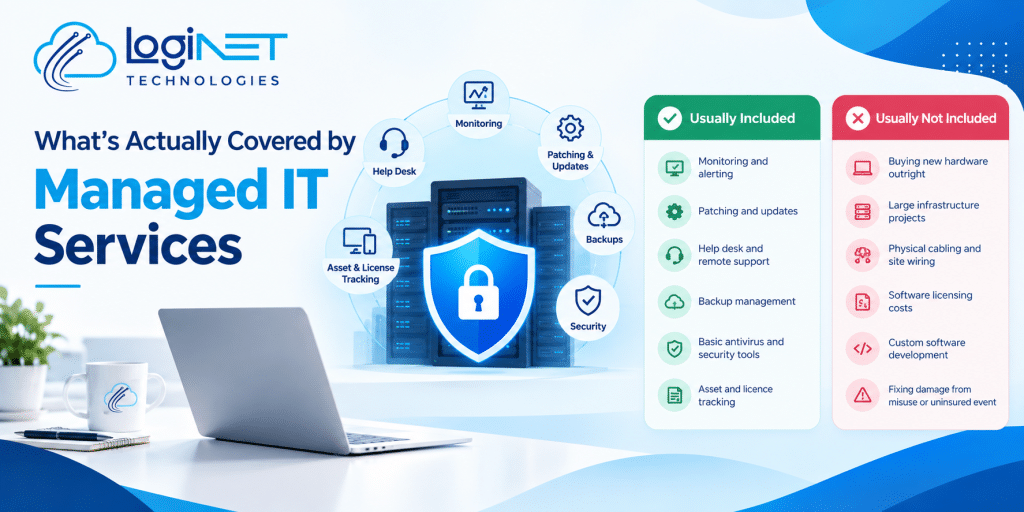
The scope varies a lot between providers, which is why the questions below matter. For a detailed breakdown, see what’s actually covered by managed IT services.
What should be included in the monthly price?
Ask for a written list of what the per-user fee covers and, just as importantly, what it doesn’t. Common grey areas include:
- Projects: new office set-ups, migrations and major upgrades are often quoted separately.
- After-hours work: is it included, billed hourly or not offered?
- On-site visits: included, capped or charged per visit?
- Software licences: Microsoft 365, security tools and backup storage may be billed on top.
- New starters and leavers: account and device set-up can be included or billed as extra work.
A good provider can explain this in a few sentences. If the answer is “it depends” for everything, expect surprise invoices.
At Loginet, managed IT plans are $84, $105 or $129 per user per month, depending on the level of cover, and ad-hoc work outside a plan is $145 per hour. Our guide to managed IT services costs in Queensland compares the common pricing models.
How long is the contract, and how do I get out of it?
This is the question many businesses wish they had asked. Some managed IT agreements run for three years or more, with exit fees or automatic renewal.
Ask:
- What is the minimum term?
- How much notice do I need to give?
- Are there exit fees?
- Is there a minimum number of users?
- Does the contract renew automatically?
Loginet has no lock-in contracts: you can leave with 30 days’ notice, and there is no minimum number of users. We think a provider should keep clients by doing good work, not by contract terms.
How quickly will they respond when something breaks?
Response time is not the same as fix time. Ask for both, by priority level. A reasonable provider will separate “the whole office is down” from “one user’s printer is slow” and set different targets for each.
Also ask:
- How do staff raise a ticket: phone, email, portal?
- Who answers? A local team, or an offshore call centre?
- How do you report on whether you met your targets?
- What happens when the first technician can’t fix it?
Our post on IT help desk services covers what a good help desk looks like, and our help desk services page explains how ours works.
Do they have people on the Gold Coast for on-site work?
Most issues are fixed remotely, often in minutes. But hardware failures, network problems and new office set-ups need someone on site. Ask where the provider’s nearest team is based and how quickly they can get to you.
Loginet’s Gold Coast team works from our office in Bundall, so on-site support is local rather than a long drive away.
How will they handle cyber security?
Security should be part of the service, not an optional extra you discover after an incident. Ask:
- Do you enforce multi-factor authentication on every account?
- How do you patch devices and applications, and how often?
- How are admin accounts controlled?
- Do you align your work with the ASD Essential Eight? If you are new to the framework, start with what the Essential Eight is.
- Do you offer staff training on phishing and scams?
Be wary of vague answers like “we use enterprise-grade security”. Ask what specifically is switched on for your business.
How are backups done, and have they been tested?
A backup that has never been restored is a hope, not a plan. Ask what is backed up (including Microsoft 365 mailboxes, OneDrive and SharePoint), where backups are stored, how long they are kept and when a restore was last tested. Ask for a test restore as part of onboarding.
What certifications and partnerships does the team hold?
Certifications show that engineers have been trained and tested on the platforms you use. Ask which vendors the provider partners with and what certifications their engineers hold, then check that these match your systems.
Loginet is a Microsoft Partner, AWS Partner and Microsoft Azure Partner. Our team of 20+ IT experts holds certifications across AWS, Microsoft, Cisco, Palo Alto, Fortinet and CEH (Certified Ethical Hacker).
What happens to our data and documentation if we leave?
You should own your accounts, data and documentation. Ask:
- Are our Microsoft 365 and domain accounts in our name?
- Will you give us admin credentials and a full system document on request?
- What is the offboarding process, and is it charged?
A provider who is confident in their service will answer this without hesitation.
What does onboarding look like?
The first few weeks set the tone. A good onboarding includes an audit of devices, accounts and licences, documentation of your network and systems, a security baseline review and a clear handover from your previous provider. Ask who will be your main contact and when your first review meeting will be.
Red flags to watch for
- Long contracts with exit fees or automatic renewal
- No written scope of what’s included
- Response times that are “best effort” only
- Reluctance to give you admin access to your own systems
- No clear answer on security or backup testing
- Pressure to sign on the spot
Managed IT on the Gold Coast with Loginet
Loginet Technologies was founded in 2022 and has supported Queensland businesses for more than four years. Our managed IT services on the Gold Coast are delivered by our Bundall-based team, with remote support for every user and on-site help when you need it. Find out more about our wider managed IT services.
Frequently asked questions
How much do managed IT services cost on the Gold Coast?
Most providers charge per user per month. Loginet’s plans are $84, $105 or $129 per user per month, and ad-hoc support is $145 per hour.
Do I have to sign a long-term contract?
Not with Loginet. There is no lock-in contract, just 30 days’ notice, and no minimum number of users.
Is managed IT worth it for a small business?
For most small businesses, yes. A fixed monthly fee usually costs less than an in-house hire and gives you a wider range of skills, plus proactive patching and monitoring that reduces downtime.
Can I switch managed IT providers mid-contract?
It depends on your current agreement. Check the notice period and any exit fees first. A new provider should help plan the handover so there is no gap in support.
Do you provide on-site support on the Gold Coast?
Yes. Our Gold Coast team works from our Bundall office and provides on-site support as well as remote help.
Ask us the hard questions
Comparing providers? Bring this checklist. Let’s talk and we will answer every question in writing, with no pressure and no lock-in.