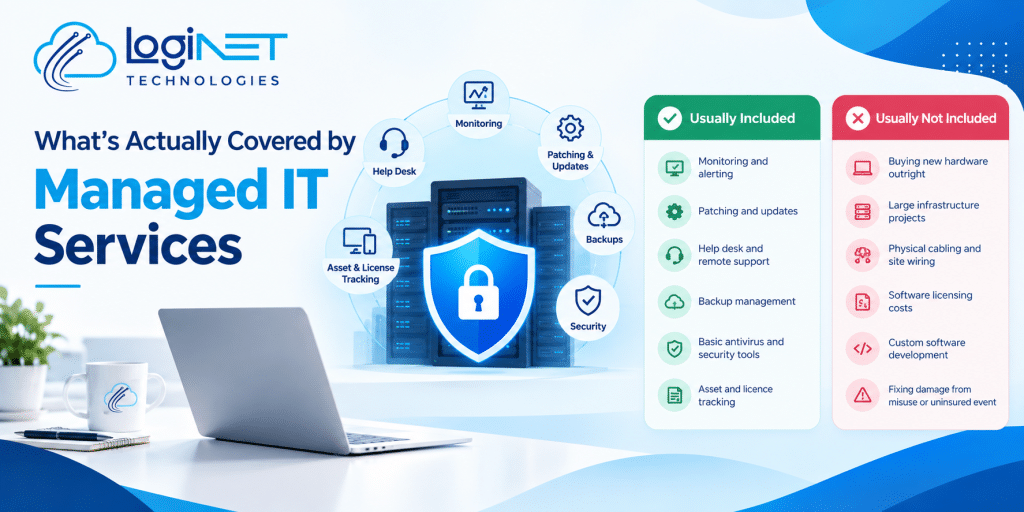
Short answer: In the first 30 days with a new managed IT provider, you should see four things happen: your systems are discovered and documented, access is handed over from your previous provider, monitoring, patching and security protection are switched on across every device, and your staff learn how to ask for help. The month should end with a review that shows what was found, what was fixed and what still needs a plan. Loginet’s managed IT includes 24/7 monitoring, patching, endpoint protection, Microsoft 365 administration and a helpdesk your team can call from day one.
Signing with a new IT provider is the easy part. The first month decides whether the relationship works, because it’s when the provider learns your environment, closes the obvious gaps and earns your staff’s trust.
Managed IT onboarding: what to have ready before day one
A smoother start comes from a little preparation on your side:
- A list of staff, their roles and who needs access to what
- Admin logins (or the contact who holds them) for Microsoft 365 or Google Workspace, your domain, firewall, Wi-Fi and any cloud services
- Details of your internet, phone and printer providers
- A list of the business software your team relies on, and who supports it
- Contact details for your current IT provider, if you have one
If you’re leaving another provider, our handover checklist for switching IT providers covers what to collect before you give notice. For a day-to-day readiness check after you switch, see our IT support Gold Coast checklist (the same checklist items apply statewide).
Week 1: discovery and access
The first week is about seeing everything clearly.
- Kick-off meeting. Agree who your main contact is, how staff should log requests and what matters most to the business.
- Access handover. Admin accounts, passwords and licence details move to the new provider, and old access is removed once the handover is complete.
- Discovery. Computers, servers, network gear, user accounts and licences are listed. This is often where forgotten accounts, unsupported devices and unused licences turn up.
- Monitoring agents installed. Each managed device gets the software that lets the provider monitor, patch and support it remotely.
Week 2: monitoring, patching and protection
With devices enrolled, the provider starts the ongoing work:
- 24/7 monitoring watches for failing disks, full storage, offline devices and missed updates.
- Patching brings Windows, macOS and common applications up to date on a schedule, rather than whenever someone remembers.
- Endpoint protection (EDR, short for endpoint detection and response) replaces or upgrades basic antivirus so threats are spotted and contained.
- Backups are checked. It’s not enough to see that backups exist; a good provider confirms what’s covered, including Microsoft 365 mailboxes, OneDrive and SharePoint, and tests a restore.
Week 3: security baseline and Microsoft 365
Next comes the security basics that most small businesses are missing:
- Multi-factor authentication (MFA) turned on for every account
- Admin rights removed from everyday user accounts
- Email security and Microsoft 365 settings reviewed
- Former staff accounts disabled and shared mailboxes tidied up
- A comparison against the Essential Eight, the Australian Government’s baseline for cyber security
Not every gap is fixed in week three. Bigger changes, such as replacing an old server or firewall, are usually listed and planned rather than rushed.
Week 4: documentation and your first review
By the end of the month you should have:
- Documentation of your network, devices, accounts, licences and key suppliers, stored where the provider (and you) can find it
- A starters and leavers process, so new staff get set up quickly and departing staff lose access the same day
- A first review meeting covering what was found, what’s been fixed, what’s still at risk and what to budget for next
How staff should feel the change
Onboarding isn’t only technical. Staff should know:
- How to log a request (email, portal or phone) and what information to include
- What counts as urgent, and how urgent issues are handled
- That remote support sessions will be requested before anyone connects to their computer
A short welcome email or one-page guide is usually enough. The aim is that people stop working around IT problems and start reporting them.
Signs onboarding isn’t going well
- Nobody has asked for a list of your staff, systems or suppliers
- You still don’t know who your main contact is
- Monitoring and patching “will be set up later”
- No one has mentioned backups, MFA or old staff accounts
- A month in, there’s no written summary of what was found
How Loginet onboards new managed IT clients
Loginet’s managed IT gives Queensland small and medium businesses one local team for managed helpdesk support, 24/7 monitoring, cybersecurity, Microsoft 365, cloud and backup. Every plan includes monitoring and patching, EDR antivirus, Microsoft 365 administration and starters and leavers, with onsite support, backup restore tests, an Essential Eight baseline and regular IT reviews on higher plans. Plans are month-to-month with no lock-in contract. We support businesses from our Toowoomba head office and Bundall office on the Gold Coast, with onsite support across Queensland and service in other Australian states.
See our managed IT services for what each plan covers.
Frequently asked questions
How long does managed IT onboarding take?
Most of the core onboarding work, including discovery, access handover, monitoring, patching and a security baseline, happens in the first few weeks. Larger fixes found during onboarding, such as replacing old hardware, are usually planned and quoted separately.
What happens during managed IT onboarding?
The provider documents your devices, accounts and licences, takes over admin access, installs monitoring software, starts patching and endpoint protection, checks backups, reviews security settings such as MFA, and holds a first review meeting to report what it found.
What do I need to provide to a new IT provider?
A staff list, admin access (or the contact who holds it) for Microsoft 365 or Google Workspace, your domain, firewall and cloud services, details of your internet and phone providers, and a list of the business software you use.
Will onboarding disrupt my staff?
It shouldn’t. Most work happens remotely and in the background. Staff may need to restart computers, set up MFA or approve a remote session, and they should be told in advance how to log requests with the new team.
What should I see at the end of the first month?
Written documentation of your systems, monitoring and patching running on every managed device, a security baseline with known gaps listed, and a review meeting covering what was fixed and what to plan next.
Does Loginet offer managed IT for small businesses in Queensland?
Yes. Loginet provides managed IT services for small and medium businesses across Queensland, including helpdesk support, 24/7 monitoring, cybersecurity, Microsoft 365, cloud and backup, on month-to-month plans.
Start with a conversation
Book a free 30-minute strategy call and we’ll talk through your current setup and what your first month with Loginet would cover.