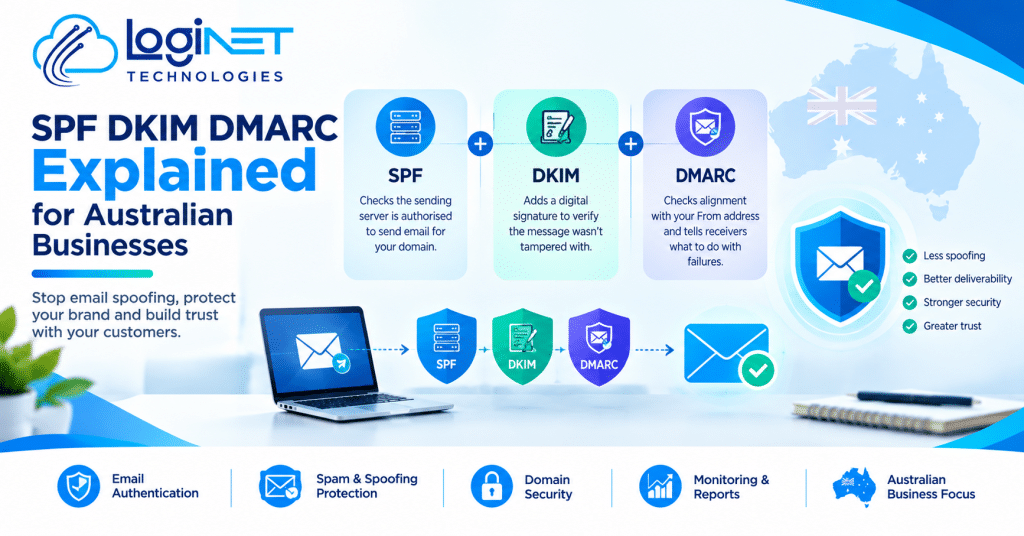
SPF DKIM DMARC Explained for Australian Businesses
SPF, DKIM and DMARC are three records in your domain’s DNS that work as a team: SPF lists the servers allowed to send email as your business, DKIM adds a tamper-evident digital signature to each message, and DMARC tells receiving mail systems what to do when a message fails those checks. Together they make it much harder for someone to send email pretending to be you, and easier for your genuine email to be trusted. That is SPF, DKIM and DMARC explained in a few sentences; the rest of this guide covers what each record does and where businesses go wrong.
If customers say your emails land in spam, or someone received a message that looked like it came from you but didn’t, you may be dealing with email spoofing. Loginet’s email security work covers exactly this, but it helps to understand what you’re asking for first.
What SPF does
SPF, short for Sender Policy Framework, is a published list of the servers allowed to send email for your domain. When a message arrives, the receiving system checks whether the server that delivered it is on your list.
It has a blind spot, though. According to the Queensland Government’s email domain security guideline, SPF checks the hidden envelope sender used to move the message between servers, not the From address your customer sees on screen. A criminal can pass SPF with a domain they control while the visible address says yours. SPF also allows no more than ten DNS lookups, and going past that makes the check fail, which catches out businesses that keep adding services to the record.
What DKIM does
DKIM, or DomainKeys Identified Mail, signs each outgoing message with a private key that only your sending system holds. The matching public key sits in your DNS, so the receiving system can check the signature and confirm the message wasn’t altered in transit. Each service that sends on your behalf normally has its own key, identified by a label called a selector.
DKIM copes with forwarding better than SPF because the signature travels with the message. Like SPF, though, it can’t prove on its own that the visible From address is honest, since the signing domain can be set to anything.
What DMARC adds
DMARC (Domain-based Message Authentication, Reporting and Conformance) closes those gaps. It asks one question: does the domain that passed SPF or DKIM match the From address the reader actually sees? That match is called alignment. A message passes DMARC if either SPF or DKIM passes with alignment, and fails if both don’t.
Two other features make it useful. You publish a policy telling receivers what to do with failures, and receivers send you reports showing who is sending email using your domain. Those reports expose forgotten sending tools and genuine impersonation attempts, including the kind used in business email compromise, where a criminal poses as a boss or supplier to redirect a payment.
How the three work together
SPF checks the server, DKIM checks the signature, and DMARC checks that whichever one passed really belongs to the address the reader sees. Because only one aligned pass is needed, setting up both is sensible: if forwarding breaks SPF, an intact DKIM signature can still carry the message through. Without DMARC, an impersonator can pass both checks on their own domain, which is why neither is enough alone.
DMARC policy: none, quarantine and reject
Your DMARC policy is a single setting with three values, and the difference matters to your business.
- None. Receivers take no action because of DMARC and send you reports instead. You gain visibility but no protection from spoofing.
- Quarantine. Failing messages are treated as suspicious, typically landing in the junk folder. Genuine mail benefits, but a convincing fake can still be found and opened there.
- Reject. Failing messages are refused outright. This is the strongest protection and the usual goal.
So why not go straight to reject? Because reject refuses anything that fails, and legitimate email often fails on first inspection. Marketing platforms, invoicing software and CRM systems commonly send as your domain from their own servers, without the SPF or DKIM setup DMARC needs. Under reject, a client’s invoice could simply never arrive. Microsoft’s DMARC setup guidance recommends moving gradually from none to quarantine to reject, and warns that some good mail will probably get caught along the way.
The mistake of publishing a record and never reading the reports
Plenty of businesses add a record at none, tick the box and move on. It feels like progress, but none doesn’t stop anyone impersonating you, and the Queensland guidance notes that attackers can see an unenforced policy and treat it as an invitation. The reports are the whole point of this stage. They arrive daily as compressed files and are close to unreadable without a reporting tool. Send them to a dedicated mailbox or group rather than one person’s inbox, and make sure somebody actually reviews them.
Reports also surface forgotten senders, such as an old website form or a supplier’s system. Each has to be authenticated, fixed or switched off before enforcement is safe.
When to get help instead of doing it yourself
A small business with one domain sending from one platform can often manage this. It gets harder quickly with several sending services, an SPF record near its lookup limit, extra domains and subdomains, or years of sending history. Domains you’ve registered but don’t use for email need a reject policy too, and they’re easy to forget.
If your mail runs on Microsoft 365 or Google Workspace, both platforms publish their own guides, and Google’s DMARC setup page is clear on the order: SPF and DKIM first, then DMARC after a 48-hour wait. The DNS side is only part of the job, though. Loginet works with Microsoft-based and Google-based email setups, and the same authentication principles apply to both.
DMARC for Australian Businesses: What This Means for You
Your domain name is part of your brand, and until DMARC is enforced, anyone can type it into a From field. Authenticated mail is also more likely to be trusted by filters, so some delivery problems can clear up. And the work doesn’t end when the record goes live: a new marketing tool or accounting package can each add a sender that needs attention.
The Australian Cyber Security Centre has urged organisations to implement DMARC , and the large mailbox providers expect authentication from bulk senders.
Common questions about SPF, DKIM and DMARC
Is SPF alone enough?
No. SPF checks the hidden envelope sender, not the From address people see, so a criminal can pass SPF on their own domain while impersonating yours. DMARC closes that gap by checking that whatever passed lines up with the visible address, which is why all three are used together.
How long does DMARC take to set up?
Adding the record itself is quick, but a careful rollout takes longer. Google advises allowing 48 hours after SPF and DKIM are working before adding DMARC, and the monitoring stage depends on how many services send as your domain and how quickly any problems are fixed.
Will DMARC stop my emails going to spam?
It can help, but it isn’t a guarantee. Many filters treat unauthenticated mail with suspicion, so proper authentication removes one common cause of junk-folder delivery. Content, sending reputation and list quality still count, so DMARC is one part of the fix rather than the whole thing.
Talk to Loginet about your email setup
If you’re not sure what your domain is publishing today, or you’d rather have someone watch the reports while you run the business, you’re welcome to get in touch with Loginet about email authentication. A short conversation is a perfectly good place to start.